Operations#
This notebook looks to explain and detail how to go about constructing a new pipeline.
[1]:
import warnings
warnings.filterwarnings('ignore')

import pyearthtools.pipeline
import pyearthtools.data

with warnings.catch_warnings(action="ignore"):
    import site_archive_nci
The construction of these pipelines can be quite complex, so it is best to take an iterative approach, slowly adding more steps and checking the output to ensure it is what you expect it to be.
pyearthtools.pipeline consists of by default the basic blocks to prepare data, and should be enough for most cases. But can be easily extended to add additonal features
All operations that are provided are accessible under pyearthtools.pipeline.operations. Multiple data types / frameworks are currently implemented,
[2]:
pyearthtools.pipeline.operations?
Type:        module
String form: <module 'pyearthtools.pipeline.operations' from '/g/data/kd24/tjl/src/PyEarthTools/packages/pipeline/src/pyearthtools/pipeline/operations/__init__.py'>
File:        /g/data/kd24/tjl/src/PyEarthTools/packages/pipeline/src/pyearthtools/pipeline/operations/__init__.py
Docstring:
Pipeline Operations

| SubModules | Info |
| ---------- | ---- |
| numpy | Numpy arrays |
| xarray | Xarray |
| dask   | Dask arrays |
| transform   | Transformations |
Each framework seeks to provide the neccessary operations to prepare data in that type, with conversion available between the three.
Dask and Numpy attempt to be exact mirrors of each other, just implemented in the host framework
[3]:
example_index = pyearthtools.data.archive.ERA5.sample()
example_index
[3]:
ERA5
    Description                    ECWMF ReAnalysis v5
             range                          '1970-current'
             Documentation                  'https://confluence.ecmwf.int/display/CKB/ERA5%3A+data+documentation'


    Initialisation
             level_value                    None
             product                        'reanalysis'
             variables                      ['2t']
    Transforms
             StandardCoordinateNames        {'latitude': "['lat', 'Latitude', 'yt_ocean', 'yt']", 'longitude': "['lon', 'Longitude', 'xt_ocean', 'xt']", 'replacement_dictionary': 'None', 'time': "['Time']"}
Rename {'names': {'t2m': "'2t'", 'u10': "'10u'", 'v10': "'10v'", 'siconc': "'ci'"}}So, we now have our index, our view into the data, it will be the first step of our pipeline.
[4]:
pipe = pyearthtools.pipeline.Pipeline(
    example_index
)
pipe
Pipeline
    Description                    `pyearthtools.pipeline` Data Pipeline


    Initialisation
             exceptions_to_ignore           None
             iterator                       None
             sampler                        None
    Steps
ERA5 {'ERA5': {'level_value': 'None', 'product': "'reanalysis'", 'variables': "['2t']"}}This is the most basic of pipelines consisting of only a single step.
Just like an pyearthtools.data.Index it can be indexed to get data from
[5]:
pipe['2000-01-01T00']
[5]:
<xarray.Dataset> Size: 8MB
Dimensions:    (longitude: 1440, latitude: 721, time: 1)
Coordinates:
  * longitude  (longitude) float32 6kB -180.0 -179.8 -179.5 ... 179.5 179.8
  * latitude   (latitude) float32 3kB 90.0 89.75 89.5 ... -89.5 -89.75 -90.0
  * time       (time) datetime64[ns] 8B 2000-01-01
Data variables:
    2t         (time, latitude, longitude) float64 8MB dask.array<chunksize=(1, 182, 360), meta=np.ndarray>
Attributes:
    Conventions:  CF-1.6
    history:      2020-09-30 21:47:55 UTC+1000 by era5_replication_tools-1.2....
    license:      Licence to use Copernicus Products: https://apps.ecmwf.int/...
    summary:      ERA5 is the fifth generation ECMWF atmospheric reanalysis o...
title: ERA5 single-levels reanalysis 2m_temperature 20000101-20000131As it is an xarry object, if we want to modify it we should use the xarray operations
[6]:
pyearthtools.pipeline.operations.xarray?
Type:        module
String form: <module 'pyearthtools.pipeline.operations.xarray' from '/g/data/kd24/tjl/src/PyEarthTools/packages/pipeline/src/pyearthtools/pipeline/operations/xarray/__init__.py'>
File:        /g/data/kd24/tjl/src/PyEarthTools/packages/pipeline/src/pyearthtools/pipeline/operations/xarray/__init__.py
Docstring:
xarray Operations

| Category | Description | Available |
| -------- | ----------- | --------- |
| Compute  | Call compute on an xarray object | `Compute` |
| Chunk  | Rechunk xarray object | `Chunk` |
| conversion | Convert datasets between numpy or dask arrays | `ToNumpy`, `ToDask` |
| filters | Filter data when iterating | `DropAnyNan`, `DropAllNan`, `DropValue`, `Shape` |
| join | Join tuples of xarray objects | `Merge`, `Concatenate` |
| metadata | Modify or keep metadata | `Rename`, `Encoding`, `MaintainEncoding`, `Attributes`, `MaintainAttributes` |
| normalisation | Normalise datasets | `Anomaly`, `Deviation`, `Division`, `Evaluated` |
| reshape | Reshape datasets | `Dimension`, `CoordinateFlatten` |
| select | Select elements from dataset's | `SelectDataset`, `DropDataset`, `SliceDataset` |
| sort | Sort variables of a dataset | `Sort` |
| split | Split datasets | `OnVariables`, `OnCoordinate` |
| values | Modify values of datasets | `FillNan`, `MaskValue`, `Clip`, `Derive` |
| remapping | Reproject data | `HEALPix` |
As this is a simple index, lets just rename the variable, and fill in nans
[7]:
pipe = pyearthtools.pipeline.Pipeline(
    example_index,
    pyearthtools.pipeline.operations.xarray.metadata.Rename({'2t':'2_metre_temperature'}),
    pyearthtools.pipeline.operations.xarray.values.FillNan(),
)
pipe
Pipeline
    Description                    `pyearthtools.pipeline` Data Pipeline


    Initialisation
             exceptions_to_ignore           None
             iterator                       None
             sampler                        None
    Steps
             ERA5                           {'ERA5': {'level_value': 'None', 'product': "'reanalysis'", 'variables': "['2t']"}}
             metadata.Rename                {'Rename': {'rename': {'2t': "'2_metre_temperature'"}}}
values.FillNan {'FillNan': {'nan': '0', 'neginf': 'None', 'posinf': 'None'}}Graph
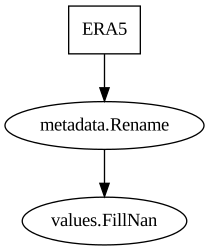
Now we can see that we have added two more steps to the pipeline, and a nice graph shows up.
Just like before, we can index into this pipeline, and get the result of the steps
[8]:
pipe['2000-01-01T00']
[8]:
<xarray.Dataset> Size: 8MB
Dimensions:              (time: 1, latitude: 721, longitude: 1440)
Coordinates:
  * longitude            (longitude) float32 6kB -180.0 -179.8 ... 179.5 179.8
  * latitude             (latitude) float32 3kB 90.0 89.75 89.5 ... -89.75 -90.0
  * time                 (time) datetime64[ns] 8B 2000-01-01
Data variables:
    2_metre_temperature  (time, latitude, longitude) float64 8MB dask.array<chunksize=(1, 182, 360), meta=np.ndarray>
Attributes:
    Conventions:  CF-1.6
    history:      2020-09-30 21:47:55 UTC+1000 by era5_replication_tools-1.2....
    license:      Licence to use Copernicus Products: https://apps.ecmwf.int/...
    summary:      ERA5 is the fifth generation ECMWF atmospheric reanalysis o...
title: ERA5 single-levels reanalysis 2m_temperature 20000101-20000131Now lets convert to dask, and apply some operations over in dask land,
[9]:
pipe = pyearthtools.pipeline.Pipeline(
    example_index,
    pyearthtools.pipeline.operations.xarray.metadata.Rename({'2t':'2_metre_temperature'}),
    pyearthtools.pipeline.operations.xarray.values.FillNan(),
    pyearthtools.pipeline.operations.xarray.conversion.ToDask(),
)
pipe
Pipeline
    Description                    `pyearthtools.pipeline` Data Pipeline


    Initialisation
             exceptions_to_ignore           None
             iterator                       None
             sampler                        None
    Steps
             ERA5                           {'ERA5': {'level_value': 'None', 'product': "'reanalysis'", 'variables': "['2t']"}}
             metadata.Rename                {'Rename': {'rename': {'2t': "'2_metre_temperature'"}}}
             values.FillNan                 {'FillNan': {'nan': '0', 'neginf': 'None', 'posinf': 'None'}}
conversion.ToDask {'ToDask': {'warn': 'True'}}Graph
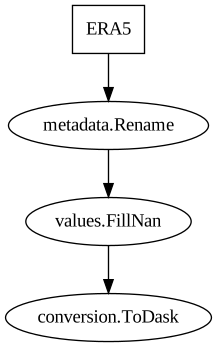
[10]:
pipe['2000-01-01T00']
[10]:
|
||||||||||||||||
As pyearthtools was developed in Australia, lets flip the world so things are the right way up
[11]:
pipe += pyearthtools.pipeline.operations.dask.augment.Flip()
pipe
Pipeline
    Description                    `pyearthtools.pipeline` Data Pipeline


    Initialisation
             exceptions_to_ignore           None
             iterator                       None
             sampler                        None
    Steps
             ERA5                           {'ERA5': {'level_value': 'None', 'product': "'reanalysis'", 'variables': "['2t']"}}
             metadata.Rename                {'Rename': {'rename': {'2t': "'2_metre_temperature'"}}}
             values.FillNan                 {'FillNan': {'nan': '0', 'neginf': 'None', 'posinf': 'None'}}
             conversion.ToDask              {'ToDask': {'warn': 'True'}}
augment.Flip {'Flip': {'axis': '-1', 'seed': '42'}}Graph
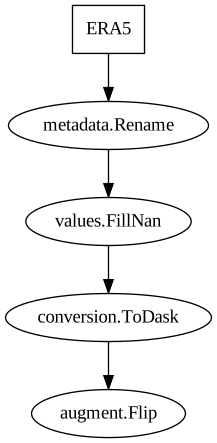
[12]:
pipe['2000-01-01T00']
[12]:
|
||||||||||||||||
Hopefully, you can see how we have added more steps to a pipeline to incremently modify the data.
Defined in a pipeline, the operations can be quite easily viewed and understood, even saved out to disk as a loadable config
We can even undo all these operations and return the data to its original form
[13]:
pipe.undo(pipe['2000-01-01T00'])
[13]:
<xarray.Dataset> Size: 8MB
Dimensions:    (time: 1, latitude: 721, longitude: 1440)
Coordinates:
  * time       (time) datetime64[ns] 8B 2000-01-01
  * latitude   (latitude) float32 3kB 90.0 89.75 89.5 ... -89.5 -89.75 -90.0
  * longitude  (longitude) float32 6kB -180.0 -179.8 -179.5 ... 179.5 179.8
Data variables:
    2t         (time, latitude, longitude) float64 8MB dask.array<chunksize=(1, 182, 360), meta=np.ndarray>
Attributes:
    Conventions:  CF-1.6
    history:      2020-09-30 21:47:55 UTC+1000 by era5_replication_tools-1.2....
    license:      Licence to use Copernicus Products: https://apps.ecmwf.int/...
    summary:      ERA5 is the fifth generation ECMWF atmospheric reanalysis o...
title: ERA5 single-levels reanalysis 2m_temperature 20000101-20000131[ ]: