Modifications#
We have seen how a simple pipeline works, data is retrieved at one end by the index given by the user, and then sequentially modified by the steps until it reaches it’s final form.
index > step > step > output
However, with pyearthtools.pipeline.modifications this flow of data can be modified, (hence the name).
We could dynamically alter the index, cache data, and more
[1]:
%%capture
import site_archive_nci
[2]:
import pyearthtools.pipeline as petpipe
import pyearthtools.data as petdata
[3]:
petpipe.modifications.__dir__()[8:]
[3]:
['__builtins__',
 'idx_modification',
 'IdxModifier',
 'IdxOverride',
 'TimeIdxModifier',
 'SequenceRetrieval',
 'TemporalRetrieval',
 'cache',
 'Cache',
 'StaticCache',
 'MemCache',
 '__all__']
Cache#
These work by overriding how Pipeline retrieves it’s initial sample. Each of these modifications knows about the steps above it and can therefore reconstruct it’s ‘parent’ pipeline in which to retrieve data with.
For example, when using the Cache, it will first check if data is already in the cache, and if not generate it and save it. It utilises the pyearthtools.data.indexes.Cache for this functionality, so utilises patterns to define the file structure.
[4]:
cached_pipeline = petpipe.Pipeline(
    petdata.archive.ERA5.sample(),
    petpipe.operations.xarray.metadata.Rename({'2t':'2_metre_temperature'}),
    petpipe.operations.xarray.values.FillNan(),
    petpipe.modifications.Cache('temp'),
)
cached_pipeline
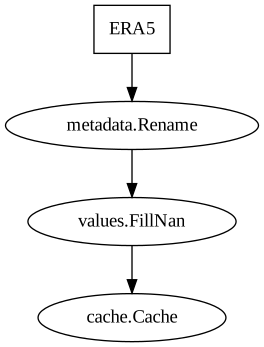
Pipeline
    Description                    `pyearthtools.pipeline` Data Pipeline


    Initialisation
             exceptions_to_ignore           None
             iterator                       None
             sampler                        None
    Steps
             ERA5                           {'ERA5': {'level_value': 'None', 'product': "'reanalysis'", 'variables': "['2t']"}}
             metadata.Rename                {'Rename': {'rename': {'2t': "'2_metre_temperature'"}}}
             values.FillNan                 {'FillNan': {'nan': '0', 'neginf': 'None', 'posinf': 'None'}}
cache.Cache {'Cache': {'cache': "'/jobfs/147557652.gadi-pbs/tmpfdwfd8pb'", 'cache_validity': "'warn'", 'pattern': 'None', 'pattern_kwargs': {}, 'save_kwargs': 'None'}}Graph
[5]:
cached_pipeline.steps[-1]
[5]:
Cache
    Initialisation                 An `pyearthtools.pipeline` implementation of the `CachingIndex` from `pyearthtools.data`.
             cache                          '/jobfs/147557652.gadi-pbs/tmpfdwfd8pb'
             cache_validity                 'warn'
             pattern                        None
             pattern_kwargs                 {}
save_kwargs NoneAdditionally, we can directly access the pyearthtools.data.Cache to check if data exists
[6]:
cached_pipeline.steps[-1].cache
[6]:
FunctionalCacheIndex
    Initialisation
             function                       <bound method Cache._generate of Cache
    Initialisation                 An `pyearthtools.pipeline` implementation of the `CachingIndex` from `pyearthtools.data`.
             cache                          '/jobfs/147557652.gadi-pbs/tmpfdwfd8pb'
             cache_validity                 'warn'
             pattern                        None
             pattern_kwargs                 {}
             save_kwargs                    None>
             pattern_kwargs                 {}
             save_kwargs                    None
             args                           ('temp', None)
    Transforms
StandardCoordinateNames {'latitude': "['lat', 'Latitude', 'yt_ocean', 'yt']", 'longitude': "['lon', 'Longitude', 'xt_ocean', 'xt']", 'replacement_dictionary': 'None', 'time': "['Time']"}It is worth pointing out that caches generate data upon any sort of lookup, so searching for them by definition, creates them, so we shall use the underlying pattern to actually check for existence.
[7]:
cached_pipeline.steps[-1].pattern.exists('2000-01-01T00')
[7]:
False
So, the data does not yet exist, but if we index into the pipeline it will be made
[8]:
%%time
cached_pipeline['2000-01-01T00']
CPU times: user 606 ms, sys: 327 ms, total: 933 ms
Wall time: 1.74 s
[8]:
<xarray.Dataset> Size: 8MB
Dimensions:              (time: 1, latitude: 721, longitude: 1440)
Coordinates:
  * longitude            (longitude) float32 6kB -180.0 -179.8 ... 179.5 179.8
  * latitude             (latitude) float32 3kB 90.0 89.75 89.5 ... -89.75 -90.0
  * time                 (time) datetime64[ns] 8B 2000-01-01
Data variables:
    2_metre_temperature  (time, latitude, longitude) float64 8MB dask.array<chunksize=(1, 721, 1440), meta=np.ndarray>
Attributes:
    Conventions:  CF-1.6
    history:      2020-09-30 21:47:55 UTC+1000 by era5_replication_tools-1.2....
    license:      Licence to use Copernicus Products: https://apps.ecmwf.int/...
    summary:      ERA5 is the fifth generation ECMWF atmospheric reanalysis o...
title: ERA5 single-levels reanalysis 2m_temperature 20000101-20000131Now we can check if this data exists on disk
[9]:
cached_pipeline.steps[-1].pattern.exists('2000-01-01T00')
[9]:
True
Because the data is cached, it should now be a lot quicker to retrieve
[10]:
%%time
cached_pipeline['2000-01-01T00']
CPU times: user 10.5 ms, sys: 3.45 ms, total: 13.9 ms
Wall time: 13.7 ms
[10]:
<xarray.Dataset> Size: 8MB
Dimensions:              (time: 1, latitude: 721, longitude: 1440)
Coordinates:
  * longitude            (longitude) float32 6kB -180.0 -179.8 ... 179.5 179.8
  * latitude             (latitude) float32 3kB 90.0 89.75 89.5 ... -89.75 -90.0
  * time                 (time) datetime64[ns] 8B 2000-01-01
Data variables:
    2_metre_temperature  (time, latitude, longitude) float64 8MB dask.array<chunksize=(1, 721, 1440), meta=np.ndarray>
Attributes:
    Conventions:  CF-1.6
    history:      2020-09-30 21:47:55 UTC+1000 by era5_replication_tools-1.2....
    license:      Licence to use Copernicus Products: https://apps.ecmwf.int/...
    summary:      ERA5 is the fifth generation ECMWF atmospheric reanalysis o...
title: ERA5 single-levels reanalysis 2m_temperature 20000101-20000131Index Modifiers#
In addition to the caches, Index Modifiers exists. They exist to alter the users data retrieved by modfiying the index.
The index can be:
Replaced
Added to
Or temporally modified
Arguably, the most useful of these is the SequenceRetrieval and its subclass TemporalRetrieval,
[11]:
petpipe.modifications.SequenceRetrieval?
Init signature:
petpipe.modifications.SequenceRetrieval(
    samples: 'Union[int, tuple[Union[tuple[int, ...], int], ...]]',
    *,
    merge_function: 'Optional[Callable]' = None,
    concat: 'bool' = False,
    merge_kwargs: 'Optional[dict[str, Any]]' = None,
)
Docstring:
Subclassing from `IdxModifier`, retrieve a sequence of samples based on rules.

Notes:

    Will attempt to stack samples, and may create a new 0 axis.

If `samples` is an `int`, then retrieve the idx originally asked for, and the sample offset by `samples`.

This will return 'sorted'.

>>> SequenceRetrieval(1)[0]
... # Will get (0, 1)
>>> SequenceRetrieval(-1)[0]
... # Will get (-1, 0)
>>> SequenceRetrieval(-6)[0]
... # Will get (-6, 0)

If `samples` is a single-element iterable, it must be of length 2 or 3, with the third being optional.
The `idx` being requested is first offset, then num_of_samples retrieved, merged where applicable.
If a single sample is retrieved, it will not be in a tuple if cannot be merged.

>>> SequenceRetrieval((0, 3))[0]
... # Will get (0, 1, 2)
>>> SequenceRetrieval((-1, 2))[0]
... # Will get (-1, 0)
>>> SequenceRetrieval((2, 3))[0]
... # Will get (2,3,4)
>>> SequenceRetrieval((2, 3, 2))[0]
... # Will get (2,4,6)
>>> SequenceRetrieval((2, 1))[0]
... # Will get 2


If `samples` is of multiples element it can consist of either tuples or ints.
A tuple in this sequence corresponds to the same as `single element`,
and an int the next offset to retrieve a sample at.

These index adjustments are accumulated, so if a retrieval moves the marker
2 forwards, the next sampling config will operate from there.

Each config in the `samples` will be returned within its own tuple, merged where applicable.

>>> SequenceRetrieval((0, 3),(1, 2))[0]
... # Will get ((0, 1, 2), (3, 4))
>>> SequenceRetrieval((0, 3),1)[0]
... # Will get ((0, 1, 2), 3)
>>> SequenceRetrieval((0, 3),2)[0]
... # Will get ((0, 1, 2), 4)
>>> SequenceRetrieval((0, 3),(-1, 2))[0]
... # Will get ((0, 1, 2), (1, 2))
>>> SequenceRetrieval((0, 3),(-1, 1))[0]
... # Will get ((0, 1, 2), 1)
Init docstring:
Sequence retrieval

Args:
    samples (Union[int, tuple[Union[tuple[int, int], tuple[int, int, int], int], ...]]):
        Configuration of samples to retrieve.
    merge_function (Optional[Callable], optional):
        Override for function to use when merging.
        Defaults to None.
    merge_kwargs (Optional[dict[str, Any]], optional):
        Optional extra kwargs for the merge function. Defaults to None.
File:           /g/data/kd24/tjl/src/PyEarthTools/packages/pipeline/src/pyearthtools/pipeline/modifications/idx_modification.py
Type:           ABCMeta
Subclasses:     TemporalRetrieval
The syntax for the arg of samples is as follows,
If a single int,
Index is modified and the original maintained, see
IdxModifierfor just a modification
If tuple,
Offset, samples (optional, defaults 1), interval (optional, defaults 1)
Where offset modifies the index, samples defines how many to get, and interval defines the steps between samples
If nested tuple,
Each tuple evaluated as above
Any data retrieved from a tuple specification will be automatically merged but returned if failed
[17]:
index_mod = petpipe.modifications.SequenceRetrieval(-3)
As we are using this independent of a pipeline, we need to override the parent_pipeline call
[18]:
class override:
    def __getitem__(self, idx): return idx

index_mod.parent_pipeline = override
[19]:
index_mod[0]
[19]:
(-3, 0)
[20]:
index_mod = petpipe.modifications.SequenceRetrieval((0,3,2))
index_mod.parent_pipeline = override
index_mod[0]
[20]:
(0, 2, 4)
TemporalRetrieval takes this same concept and applies it to time indexes using pyearthtools.data.pyearthtoolsDatetime
[ ]: