Additional Pipeline Syntaxes#
This notebooks introduces syntaxes to ease creation and manipulation of Pipelineobjects:
named pipelines,
combination using
|operation,reversing pipelines.
[1]:
import numpy as np

def repr_ndarray(arr):
    return f"array(..., shape={arr.shape}, dtype={arr.dtype})"

np.set_printoptions(override_repr=repr_ndarray)
[2]:
import pyearthtools.data
import pyearthtools.pipeline
To illustrate these features, we’ll reuse the same pipeline as the one used in the End-to-end CNN Training Example. Here is the original definition of the pipeline.
[3]:
pyearthtools.pipeline.Pipeline(
    pyearthtools.data.download.weatherbench.WB2ERA5(
        variables=["2m_temperature", "u", "v", "geopotential", "vorticity"],
        level=[850],
        license_ok=True,
    ),
    pyearthtools.pipeline.operations.xarray.Sort(
        ["2m_temperature", "u_component_of_wind", "v_component_of_wind", "vorticity", "geopotential"]
    ),
    pyearthtools.data.transforms.coordinates.StandardLongitude(type="0-360"),
    pyearthtools.pipeline.operations.xarray.reshape.CoordinateFlatten(["level"]),
    pyearthtools.pipeline.modifications.TemporalRetrieval(
        concat=True, samples=((0, 1), (6, 1))
    ),
    pyearthtools.pipeline.operations.xarray.conversion.ToNumpy(),
    pyearthtools.pipeline.operations.numpy.reshape.Rearrange("c t h w -> t c h w"),
    pyearthtools.pipeline.operations.numpy.reshape.Squeeze(axis=0),
)
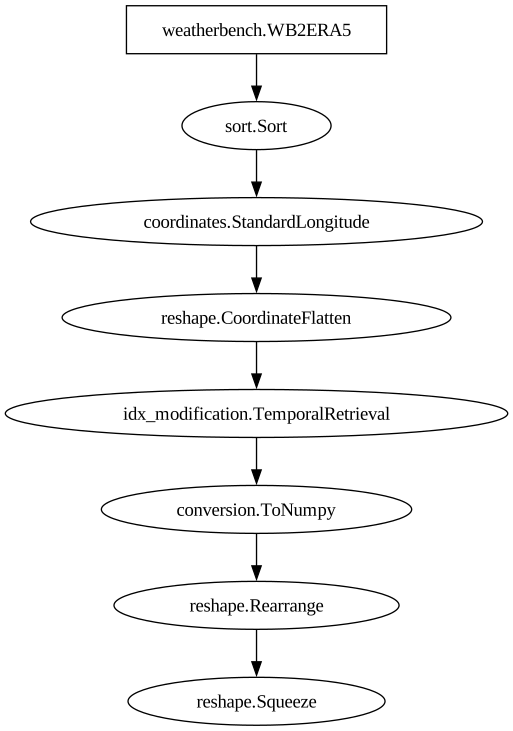
Pipeline
    Description                    `pyearthtools.pipeline` Data Pipeline


    Initialisation
             exceptions_to_ignore           None
             iterator                       None
             name                           None
             sampler                        None
    Steps
             weatherbench.WB2ERA5           {'WB2ERA5': {'level': '[850]', 'license_ok': 'True', 'resolution': "'64x32'", 'variables': "['2m_temperature', 'u', 'v', 'geopotential', 'vorticity']"}}
             sort.Sort                      {'Sort': {'order': "['2m_temperature', 'u_component_of_wind', 'v_component_of_wind', 'vorticity', 'geopotential']", 'strict': 'False'}}
             coordinates.StandardLongitude  {'StandardLongitude': {'longitude_name': "'longitude'", 'type': "'0-360'"}}
             reshape.CoordinateFlatten      {'CoordinateFlatten': {'coordinate': "['level']", 'skip_missing': 'False'}}
             idx_modification.TemporalRetrieval {'TemporalRetrieval': {'concat': 'True', 'delta_unit': 'None', 'merge_function': 'None', 'merge_kwargs': 'None', 'samples': '((0, 1), (6, 1))'}}
             conversion.ToNumpy             {'ToNumpy': {'reference_dataset': 'None', 'run_parallel': 'False', 'saved_records': 'None', 'warn': 'True'}}
             reshape.Rearrange              {'Rearrange': {'rearrange': "'c t h w -> t c h w'", 'rearrange_kwargs': 'None', 'reverse_rearrange': 'None', 'skip': 'False'}}
reshape.Squeeze {'Squeeze': {'axis': '0'}}Graph
Named pipelines#
When developing a new pipeline, it can be convenient to separate the main stages of a long pipeline into these sub-pipelines, and assemble them into one big pipeline afterwards. However, once the pipeline has been assembled, we loose access to the sub-pipelines. To solve this, we can add a name to each of the sub-pipelines. Then, in the final pipeline, we can recover them via the .named attribute, which is a dictionary of all the named sub-pipelines contained in a pipeline.
In the following example, we build the same pipeline but split into 3 stages:
a named pipeline “prepare”, to fetch the data and apply few transformation on it,
a temporal retrieval step, to generate the tuple of (features, target) samples,
a named pipeline “reshape”, to do the final convertion to numpy and reshaping.
[4]:
pipeline = pyearthtools.pipeline.Pipeline(
    pyearthtools.pipeline.Pipeline(
        pyearthtools.data.download.weatherbench.WB2ERA5(
            variables=["2m_temperature", "u", "v", "geopotential", "vorticity"],
            level=[850],
            license_ok=True,
        ),
        pyearthtools.pipeline.operations.xarray.Sort(
            ["2m_temperature", "u_component_of_wind", "v_component_of_wind", "vorticity", "geopotential"]
        ),
        pyearthtools.data.transforms.coordinates.StandardLongitude(type="0-360"),
        pyearthtools.pipeline.operations.xarray.reshape.CoordinateFlatten(["level"]),
        name="prepare"
    ),
    pyearthtools.pipeline.modifications.TemporalRetrieval(concat=True, samples=((0, 1), (6, 1))),
    pyearthtools.pipeline.Pipeline(
        pyearthtools.pipeline.operations.xarray.conversion.ToNumpy(),
        pyearthtools.pipeline.operations.numpy.reshape.Rearrange("c t h w -> t c h w"),
        pyearthtools.pipeline.operations.numpy.reshape.Squeeze(axis=0),
        name="reshape"
    ),
)
pipeline
Pipeline
    Description                    `pyearthtools.pipeline` Data Pipeline


    Initialisation
             exceptions_to_ignore           None
             iterator                       None
             name                           None
             sampler                        None
    Steps
             weatherbench.WB2ERA5           {'WB2ERA5': {'level': '[850]', 'license_ok': 'True', 'resolution': "'64x32'", 'variables': "['2m_temperature', 'u', 'v', 'geopotential', 'vorticity']"}}
             sort.Sort                      {'Sort': {'order': "['2m_temperature', 'u_component_of_wind', 'v_component_of_wind', 'vorticity', 'geopotential']", 'strict': 'False'}}
             coordinates.StandardLongitude  {'StandardLongitude': {'longitude_name': "'longitude'", 'type': "'0-360'"}}
             reshape.CoordinateFlatten      {'CoordinateFlatten': {'coordinate': "['level']", 'skip_missing': 'False'}}
             idx_modification.TemporalRetrieval {'TemporalRetrieval': {'concat': 'True', 'delta_unit': 'None', 'merge_function': 'None', 'merge_kwargs': 'None', 'samples': '((0, 1), (6, 1))'}}
             conversion.ToNumpy             {'ToNumpy': {'reference_dataset': 'None', 'run_parallel': 'False', 'saved_records': 'None', 'warn': 'True'}}
             reshape.Rearrange              {'Rearrange': {'rearrange': "'c t h w -> t c h w'", 'rearrange_kwargs': 'None', 'reverse_rearrange': 'None', 'skip': 'False'}}
reshape.Squeeze {'Squeeze': {'axis': '0'}}Graph
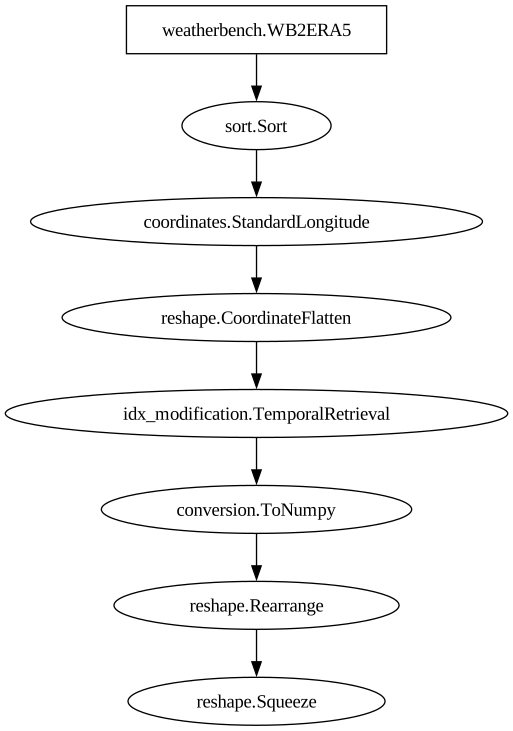
We can inspect the .named attribute to see which named pipelines are accessible within a pipeline.
[5]:
pipeline.named.keys()
[5]:
dict_keys(['prepare', 'reshape'])
Then we can access the named pipeline “prepare” as follows.
[6]:
pipeline.named["prepare"]
Pipeline
    Description                    `pyearthtools.pipeline` Data Pipeline


    Initialisation
             exceptions_to_ignore           None
             iterator                       None
             name                           'prepare'
             sampler                        None
    Steps
             weatherbench.WB2ERA5           {'WB2ERA5': {'level': '[850]', 'license_ok': 'True', 'resolution': "'64x32'", 'variables': "['2m_temperature', 'u', 'v', 'geopotential', 'vorticity']"}}
             sort.Sort                      {'Sort': {'order': "['2m_temperature', 'u_component_of_wind', 'v_component_of_wind', 'vorticity', 'geopotential']", 'strict': 'False'}}
             coordinates.StandardLongitude  {'StandardLongitude': {'longitude_name': "'longitude'", 'type': "'0-360'"}}
reshape.CoordinateFlatten {'CoordinateFlatten': {'coordinate': "['level']", 'skip_missing': 'False'}}Graph
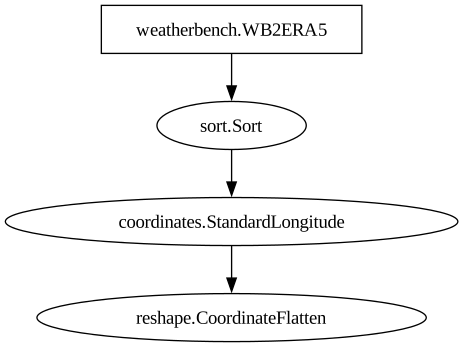
And even use it without the rest of the pipeline, as it includes a data source.
[7]:
pipeline.named["prepare"]["20210101T00"]
[7]:
<xarray.Dataset> Size: 42kB
Dimensions:                 (latitude: 32, longitude: 64, time: 1)
Coordinates:
  * latitude                (latitude) float64 256B -87.19 -81.56 ... 87.19
  * longitude               (longitude) float64 512B 0.0 5.625 ... 348.8 354.4
  * time                    (time) datetime64[ns] 8B 2021-01-01
Data variables:
    2m_temperature          (time, longitude, latitude) float32 8kB dask.array<chunksize=(1, 64, 32), meta=np.ndarray>
    u_component_of_wind850  (time, longitude, latitude) float32 8kB dask.array<chunksize=(1, 64, 32), meta=np.ndarray>
    v_component_of_wind850  (time, longitude, latitude) float32 8kB dask.array<chunksize=(1, 64, 32), meta=np.ndarray>
    vorticity850            (time, longitude, latitude) float32 8kB dask.array<chunksize=(1, 64, 32), meta=np.ndarray>
    geopotential850         (time, longitude, latitude) float32 8kB dask.array<chunksize=(1, 64, 32), meta=np.ndarray>
Attributes:
level-dtype: int64Pipe operator#
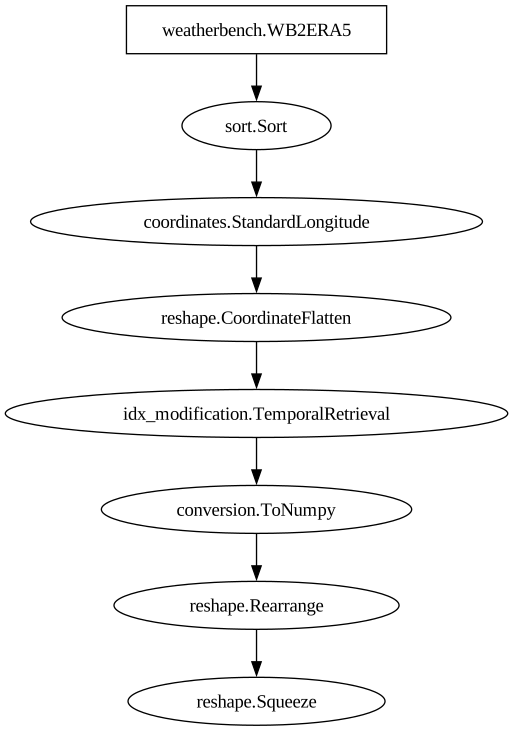
The Pipeline object also support the | operator (logical or) as a way to combine multiple pipelines together. This has the same effect as creating a new Pipeline object as a combination of 2 pipelines (or a pipeline and a step). This has not additional effect and can be used to increase the readability when building a long pipeline.
In the following example, we now create the sub-pipelines and the temporal retrieval step separately, as distinct objects, then combine them using the | operator.
[8]:
prepare = pyearthtools.pipeline.Pipeline(
    pyearthtools.data.download.weatherbench.WB2ERA5(
        variables=["2m_temperature", "u", "v", "geopotential", "vorticity"],
        level=[850],
        license_ok=True,
    ),
    pyearthtools.pipeline.operations.xarray.Sort(
        ["2m_temperature", "u_component_of_wind", "v_component_of_wind", "vorticity", "geopotential"]
    ),
    pyearthtools.data.transforms.coordinates.StandardLongitude(type="0-360"),
    pyearthtools.pipeline.operations.xarray.reshape.CoordinateFlatten(["level"]),
    name="prepare"
)

retrieve = pyearthtools.pipeline.modifications.TemporalRetrieval(concat=True, samples=((0, 1), (6, 1)))

reshape = pyearthtools.pipeline.Pipeline(
    pyearthtools.pipeline.operations.xarray.conversion.ToNumpy(),
    pyearthtools.pipeline.operations.numpy.reshape.Rearrange("c t h w -> t c h w"),
    pyearthtools.pipeline.operations.numpy.reshape.Squeeze(axis=0),
    name="reshape"
)

pipeline = prepare | retrieve | reshape
pipeline
Pipeline
    Description                    `pyearthtools.pipeline` Data Pipeline


    Initialisation
             exceptions_to_ignore           None
             iterator                       None
             name                           None
             sampler                        None
    Steps
             weatherbench.WB2ERA5           {'WB2ERA5': {'level': '[850]', 'license_ok': 'True', 'resolution': "'64x32'", 'variables': "['2m_temperature', 'u', 'v', 'geopotential', 'vorticity']"}}
             sort.Sort                      {'Sort': {'order': "['2m_temperature', 'u_component_of_wind', 'v_component_of_wind', 'vorticity', 'geopotential']", 'strict': 'False'}}
             coordinates.StandardLongitude  {'StandardLongitude': {'longitude_name': "'longitude'", 'type': "'0-360'"}}
             reshape.CoordinateFlatten      {'CoordinateFlatten': {'coordinate': "['level']", 'skip_missing': 'False'}}
             idx_modification.TemporalRetrieval {'TemporalRetrieval': {'concat': 'True', 'delta_unit': 'None', 'merge_function': 'None', 'merge_kwargs': 'None', 'samples': '((0, 1), (6, 1))'}}
             conversion.ToNumpy             {'ToNumpy': {'reference_dataset': 'None', 'run_parallel': 'False', 'saved_records': 'None', 'warn': 'True'}}
             reshape.Rearrange              {'Rearrange': {'rearrange': "'c t h w -> t c h w'", 'rearrange_kwargs': 'None', 'reverse_rearrange': 'None', 'skip': 'False'}}
reshape.Squeeze {'Squeeze': {'axis': '0'}}Graph
[9]:
pipeline["20210101T00"]
[9]:
(array(..., shape=(5, 64, 32), dtype=float32),
 array(..., shape=(5, 64, 32), dtype=float32))
Reversed pipeline#
Pipelines can be reversed, i.e. undoing their effect. The reverse of a pipeline can be obtained via the .reversed atttribute.
Important: Depending on the steps in a pipeline, some might have a proper “undo” method but others will just be skipped, i.e. will not apply any change to the sample while undoing the pipeline. In our example, it is the case of the pyearthtools.data.download.weatherbench.WB2ERA5 and pyearthtools.pipeline.modifications.TemporalRetrieval steps.
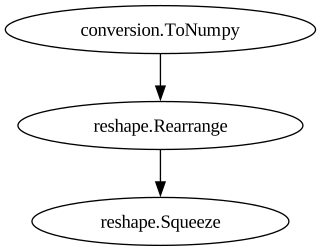
In the following example, we’ll reverse the “reshape” sub-pipeline, which is only made of reversible steps.
[10]:
pipeline.named["reshape"]
Pipeline
    Description                    `pyearthtools.pipeline` Data Pipeline


    Initialisation
             exceptions_to_ignore           None
             iterator                       None
             name                           'reshape'
             sampler                        None
    Steps
             conversion.ToNumpy             {'ToNumpy': {'reference_dataset': 'None', 'run_parallel': 'False', 'saved_records': 'None', 'warn': 'True'}}
             reshape.Rearrange              {'Rearrange': {'rearrange': "'c t h w -> t c h w'", 'rearrange_kwargs': 'None', 'reverse_rearrange': 'None', 'skip': 'False'}}
reshape.Squeeze {'Squeeze': {'axis': '0'}}Graph
[11]:
pipeline.named["reshape"].reversed
[11]:
ReversedPipeline
    Initialisation                 Operation reversing the effect of pipeline
forward_pipeline {'Pipeline': {'__args': "(ToNumpy\n\tInitialisation Convert xarray objects to np.ndarray's\n\t\t reference_dataset None\n\t\t run_parallel False\n\t\t saved_records None\n\t\t warn True, Rearrange\n\tInitialisation Operation to rearrange data using einops\n\t\t rearrange 'c t h w -> t c h w'\n\t\t rearrange_kwargs None\n\t\t reverse_rearrange None\n\t\t skip False, Squeeze\n\tInitialisation Operation to Squeeze one-Dimensional axes at 'axis' location\n\t\t axis 0)", 'exceptions_to_ignore': 'None', 'iterator': 'None', 'name': "'reshape'", 'sampler': 'None'}}To test it, we’ll fetch a sample from the “prepare” pipeline, reshape it and apply the reverse.
[12]:
(prepare | reshape | reshape.reversed)["20210101T00"]
[12]:
<xarray.Dataset> Size: 42kB
Dimensions:                 (time: 1, longitude: 64, latitude: 32)
Coordinates:
  * time                    (time) datetime64[ns] 8B 2021-01-01
  * longitude               (longitude) float64 512B 0.0 5.625 ... 348.8 354.4
  * latitude                (latitude) float64 256B -87.19 -81.56 ... 87.19
Data variables:
    2m_temperature          (time, longitude, latitude) float32 8kB 241.9 ......
    u_component_of_wind850  (time, longitude, latitude) float32 8kB -3.03 ......
    v_component_of_wind850  (time, longitude, latitude) float32 8kB -0.7963 ....
    vorticity850            (time, longitude, latitude) float32 8kB -1.147e-0...
    geopotential850         (time, longitude, latitude) float32 8kB 1.117e+04...
Attributes:
level-dtype: int64End-to-end inference pipeline example#
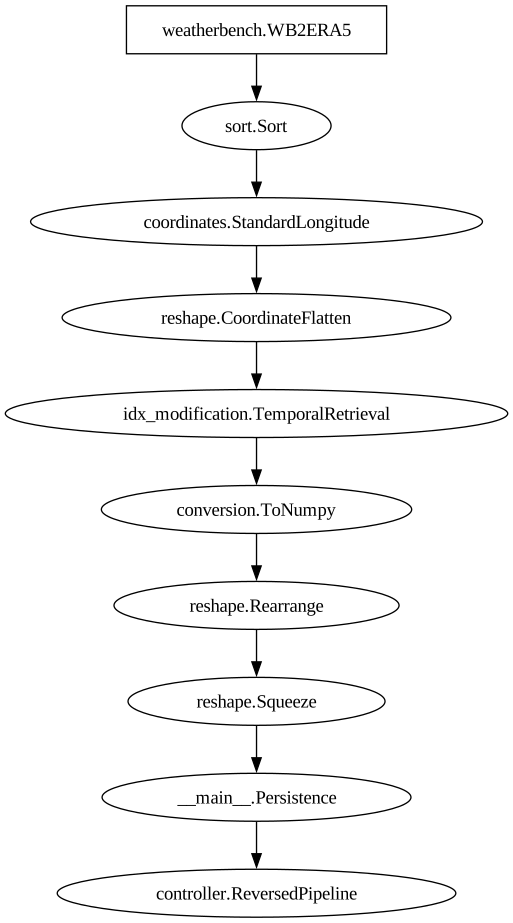
Now, let’s imagine one of our steps is an inference from a model, returning a numpy array. To create an end-to-end pipeline, generating xarray samples in the same space as the original data source, we will reverse the whole preparation pipeline and add it at the end. Note that in the reversed pipeline, the pyearthtools.data.download.weatherbench.WB2ERA5 and pyearthtools.pipeline.modifications.TemporalRetrieval steps do not apply any effect on the sample being transformed, being
effectively skipped.
For illustration purpose, we will use a simple persistence model, that return the last sample from the tuple generated via pyearthtools.pipeline.modifications.TemporalRetrieval.
[13]:
from pyearthtools.pipeline.step import PipelineStep

class Persistence(PipelineStep):
    def __init__(self):
        super().__init__()
        self.record_initialisation()
    def run(self, sample):
        return sample[-1]

persistence = Persistence()
We can run create an inference pipeline by adding it at the end of our preprocessing pipeline. Unfortunately, this returns a numpy array sample when queried, missing all the information about variable names and coordinates.
[14]:
(pipeline | persistence)["20210101T00"]
[14]:
array(..., shape=(5, 64, 32), dtype=float32)
To get a real end-to-end pipeline, we just need to add the preprocessing pipeline reversed.
[15]:
end_to_end = pipeline | persistence | pipeline.reversed
end_to_end
Pipeline
    Description                    `pyearthtools.pipeline` Data Pipeline


    Initialisation
             exceptions_to_ignore           None
             iterator                       None
             name                           None
             sampler                        None
    Steps
             weatherbench.WB2ERA5           {'WB2ERA5': {'level': '[850]', 'license_ok': 'True', 'resolution': "'64x32'", 'variables': "['2m_temperature', 'u', 'v', 'geopotential', 'vorticity']"}}
             sort.Sort                      {'Sort': {'order': "['2m_temperature', 'u_component_of_wind', 'v_component_of_wind', 'vorticity', 'geopotential']", 'strict': 'False'}}
             coordinates.StandardLongitude  {'StandardLongitude': {'longitude_name': "'longitude'", 'type': "'0-360'"}}
             reshape.CoordinateFlatten      {'CoordinateFlatten': {'coordinate': "['level']", 'skip_missing': 'False'}}
             idx_modification.TemporalRetrieval {'TemporalRetrieval': {'concat': 'True', 'delta_unit': 'None', 'merge_function': 'None', 'merge_kwargs': 'None', 'samples': '((0, 1), (6, 1))'}}
             conversion.ToNumpy             {'ToNumpy': {'reference_dataset': 'None', 'run_parallel': 'False', 'saved_records': 'None', 'warn': 'True'}}
             reshape.Rearrange              {'Rearrange': {'rearrange': "'c t h w -> t c h w'", 'rearrange_kwargs': 'None', 'reverse_rearrange': 'None', 'skip': 'False'}}
             reshape.Squeeze                {'Squeeze': {'axis': '0'}}
             __main__.Persistence           {'Persistence': {}}
controller.ReversedPipeline {'ReversedPipeline': {'forward_pipeline': {'Pipeline': {'__args': '(WB2ERA5\n\tDescription WeatherBench2 cloud-optimized ground truth ERA5 dataset\n\t\t link \'https://github.com/google-research/weatherbench2\'\n\n\n\tInitialisation \n\t\t level [850]\n\t\t license_ok True\n\t\t resolution \'64x32\'\n\t\t variables [\'2m_temperature\', \'u\', \'v\', \'geopotential\', \'vorticity\']\n\tTransforms \n\t\t StandardCoordinateNames {\'latitude\': "[\'lat\', \'Latitude\', \'yt_ocean\', \'yt\']", \'longitude\': "[\'lon\', \'Longitude\', \'xt_ocean\', \'xt\']", \'replacement_dictionary\': \'None\', \'time\': "[\'Time\']"}, Sort\n\tInitialisation Sort Variables of an `xarray` object\n\t\t order [\'2m_temperature\', \'u_component_of_wind\', \'v_component_of_wind\', \'vorticity\', \'geopotential\']\n\t\t strict False, StandardLongitude\n\tInitialisation Standardise format of longitude.\n\t\t longitude_name \'longitude\'\n\t\t type \'0-360\', CoordinateFlatten\n\tInitialisation Flatten a coordinate in a dataset into separate variables.\n\t\t coordinate [\'level\']\n\t\t skip_missing False, TemporalRetrieval\n\tInitialisation Retrieve a sequence of samples from `SequenceRetrieval`,\n\t\t concat True\n\t\t delta_unit None\n\t\t merge_function None\n\t\t merge_kwargs None\n\t\t samples ((0, 1), (6, 1)), ToNumpy\n\tInitialisation Convert xarray objects to np.ndarray\'s\n\t\t reference_dataset None\n\t\t run_parallel False\n\t\t saved_records None\n\t\t warn True, Rearrange\n\tInitialisation Operation to rearrange data using einops\n\t\t rearrange \'c t h w -> t c h w\'\n\t\t rearrange_kwargs None\n\t\t reverse_rearrange None\n\t\t skip False, Squeeze\n\tInitialisation Operation to Squeeze one-Dimensional axes at \'axis\' location\n\t\t axis 0)', 'exceptions_to_ignore': 'None', 'iterator': 'None', 'name': 'None', 'sampler': 'None'}}}}Graph
[16]:
end_to_end["20210101T00"]
[16]:
<xarray.Dataset> Size: 42kB
Dimensions:              (time: 1, longitude: 64, latitude: 32, level: 1)
Coordinates:
  * time                 (time) datetime64[ns] 8B 2021-01-01
  * longitude            (longitude) float64 512B 0.0 5.625 ... 348.8 354.4
  * latitude             (latitude) float64 256B -87.19 -81.56 ... 81.56 87.19
  * level                (level) float64 8B 850.0
Data variables:
    2m_temperature       (time, longitude, latitude) float32 8kB 241.8 ... 260.0
    u_component_of_wind  (time, longitude, latitude) float32 8kB -2.618 ... -...
    v_component_of_wind  (time, longitude, latitude) float32 8kB -2.405 ... 1...
    vorticity            (time, longitude, latitude) float32 8kB -1.714e-05 ....
geopotential (time, longitude, latitude) float32 8kB 1.12e+04 ......Note that our simple model doesn’t handle the time information, so we would need to fix the time information of the sample, for example adding 6 hours to the time coordinate if we are forecasting at T+6H.
[ ]: